1333
No
server.xml
				<Context docBase="MemberMVC" path="/MemberMVC" reloadable="true"
					source="org.eclipse.jst.jee.server:MemberMVC" >
				<Resource auth="Container" driverClassName="oracle.jdbc.driver.OracleDriver"
					loginTimeout="10" maxWait="5000" name="jdbc/pool" password="1111"
					type="javax.sql.DataSource" url="jdbc:oracle:thin:@localhost:1521:XE"
					username="system" />
				</Context>
Header.jsp
<%@ page language="java" contentType="text/html; charset=UTF-8"
    pageEncoding="UTF-8"%>
	<meta http-equiv="Content-Type" content="text/html; charset=UTF-8">
    <meta http-equiv="X-UA-Compatible" content="IE=edge">
    <meta name="viewport" content="width=device-width, initial-scale=1">
    <!-- 위 3개의 메타 태그는 *반드시* head 태그의 처음에 와야합니다; 어떤 다른 콘텐츠들은 반드시 이 태그들 *다음에* 와야 합니다 -->
    <title>동영상과 다르게  부트스트랩 적용 Head 부분만 붙이면 됩니다.</title>
<!-- 합쳐지고 최소화된 최신 CSS -->
<link rel="stylesheet" href="https://maxcdn.bootstrapcdn.com/bootstrap/3.3.2/css/bootstrap.min.css">

<!-- 부가적인 테마 -->
<link rel="stylesheet" href="https://maxcdn.bootstrapcdn.com/bootstrap/3.3.2/css/bootstrap-theme.min.css">

<!-- 합쳐지고 최소화된 최신 자바스크립트 -->
<script src="https://maxcdn.bootstrapcdn.com/bootstrap/3.3.2/js/bootstrap.min.js"></script>

    <!-- IE8 에서 HTML5 요소와 미디어 쿼리를 위한 HTML5 shim 와 Respond.js -->
    <!-- WARNING: Respond.js 는 당신이 file:// 을 통해 페이지를 볼 때는 동작하지 않습니다. -->
    <!--[if lt IE 9]>
      <script src="https://oss.maxcdn.com/html5shiv/3.7.2/html5shiv.min.js"></script>
      <script src="https://oss.maxcdn.com/respond/1.4.2/respond.min.js"></script>
    <![endif]-->
MemberJoin.jsp
<%@ page language="java" contentType="text/html; charset=UTF-8"
pageEncoding="UTF-8"%>
<!DOCTYPE html>
<html>
<head>
<jsp:include page="Header.jsp" />
</head>
<body>
<div class="container">
<div class="row">
<div class="col-sm-12 text-center" >
<div class="col-sm-3"></div>
<div class="col-sm-6">
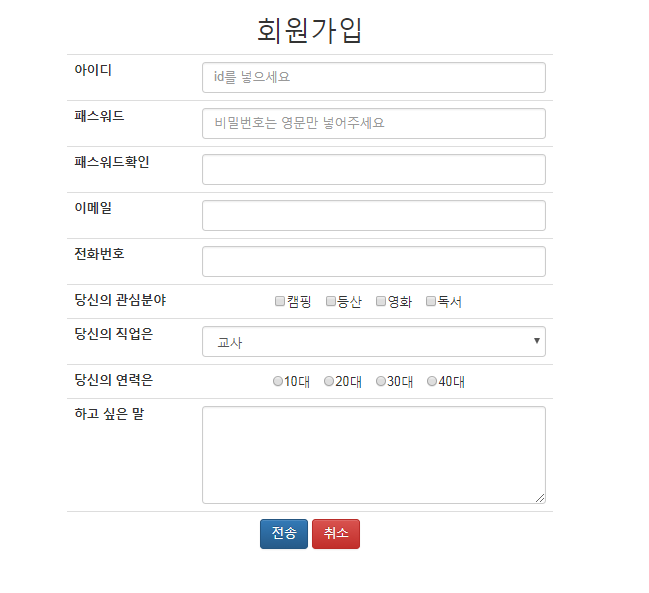
<h2>회원가입</h2>
<form action="proc.do" method="post">
<table class="table table-boardered">
<tr>
<th>아이디</th>
<td><input type="text" class="form-control" name="id" placeholder="id를 넣으세요"></td>
</tr>
<tr>
<th>패스워드</th>
<td><input type="password" class="form-control" name="pass1" placeholder="비밀번호는 영문만 넣어주세요"></td>
</tr>
<tr>
<th>패스워드확인</th>
<td><input type="password" class="form-control" name="pass2"></td>
</tr>
<tr>
<th>이메일</th>
<td><input type="email" class="form-control" name="email"></td>
</tr>
<tr>
<th>전화번호</th>
<td><input type="tel" class="form-control" name="tel"></td>
</tr>
<tr>
<th>당신의 관심분야</th>
<td>
<input type="checkbox" name="hobby" value="캠핑">캠핑
<input type="checkbox" name="hobby" value="등산">등산
<input type="checkbox" name="hobby" value="영화">영화
<input type="checkbox" name="hobby" value="독서">독서
</td>
</tr>
<tr>
<th>당신의 직업은</th>
<td>
<select name="job" class="form-control">
<option value="교사">교사</option>
<option value="변호사">변호사</option>
<option value="의사">의사</option>
<option value="기술사">기술사</option>
</select>
</td>
</tr>
<tr>
<th>당신의 연력은</th>
<td>
<input type="radio" name="age" value="10">10대
<input type="radio" name="age" value="20">20대
<input type="radio" name="age" value="30">30대
<input type="radio" name="age" value="40">40대
</td>
</tr>
<tr>
<th>하고 싶은 말</th>
<td>
<textarea rows="5" cols="40" name="info" class="form-control"></textarea>
</td>
</tr>
<tr>
<td colspan="2">
<input type="submit" class="btn btn-primary" value="전송">
<input type="reset" class="btn btn-danger" value="취소">
</td>
</tr>
</table>
</form>
</div>
</div>
</div>
</div>
</body>
</html>
class MemberBean
public class MemberBean {

	private String id;
	private String pass1;
	private String pass2;
	private String email;
	private String tel;
	private String hobby;
	private String job;
	private String age;
	private String info;


   setter, getter

   ~
}
class MemberJoinProc
package model;

import java.io.IOException;
import javax.servlet.ServletException;
import javax.servlet.annotation.WebServlet;
import javax.servlet.http.HttpServlet;
import javax.servlet.http.HttpServletRequest;
import javax.servlet.http.HttpServletResponse;

@WebServlet("/proc")
public class MemberJoinProc extends HttpServlet {


	protected void doGet(HttpServletRequest request, HttpServletResponse response) throws ServletException, IOException {
		reqPro(request, response);
	}


	protected void doPost(HttpServletRequest request, HttpServletResponse response) throws ServletException, IOException {

		reqPro(request, response);
	}

	protected void reqPro(HttpServletRequest request, HttpServletResponse response) throws ServletException, IOException {
                request.setCharacterEncoding("UTF-8");
                MemberBean bean=new MemberBean();
		bean.setId(request.getParameter("id"));
		bean.setAge(request.getParameter("age"));
		bean.setEmail(request.getParameter("email"));
		String[] arr=request.getParameterValues("hobby");
		String data="";
		for(String string : arr){
			data +=string + " ";//하나의 스트림으로 데이터 연결

		}
		bean.setHobby(data);

		bean.setInfo(request.getParameter("info"));
		bean.setJob(request.getParameter("job"));
		bean.setPass1(request.getParameter("pass1"));
		bean.setPass2(request.getParameter("pass2"));
		bean.setTel(request.getParameter("tel"));

		//데이터 베이스 객체 선언한후 저장

	}
}
동영상 강좌와 다르게 모바일 적용이 가능한 반응형 부트스트랩을 사용하였다.
여기서는 jsp 를 배우는 강좌 이기 때문에 html 적 요소에는 비중있게 생각 하지 않아도 될 것이다.
또한, 일부 자바 코드는 제 입맛에 맞게 변경 하였습니다.
혹시, 이 강의를 들으면서 제 글을 읽고 소스코드를 참조하는 수강생이 있다면 동영상의 코드와 다르다고 생각지 마세요. 대부분 동여상 내용과 같으니 학습에 도움이 될거라 생각 합니다.
소스 : https://github.com/braverokmc79/jsp_sin
유튜브 동영상 출처 :
강사 : 신형섭(잭임연구원)
저작권 : (주)소프트캠퍼스 http://www.softcampus.co.kr 더많은 무료 강의는 사이트에서 확인하실수 있습니다.
















댓글 ( 4)
댓글 남기기